Overview
UI/browser automation tests can be brittle, because tests hook into implementation details of the UI which may not be relevant for actual user interaction. Visual test automation is more robust, because it uses the UI in the same way a user is supposed to do. This post explains a solution for visual browser automation.
OmniParser
Developed by Microsoft, OmniParser [OMN] is a pure vision-based graphical user interface parsing model. Unfortunately, it can’t run directly from ollama (or similar) and requires some plumbing (which I’ve done for you). It extracts “interesting” elements from a screenshot and generates structured data (like bounding boxes and functional labels) without relying on the document object model [DOM] or accessibility trees. Here’s the original research paper [PAP].
Motivation for running offline
Running machine learning models offline ensures that sensitive data they process doesn’t leave premises. It also may reduce operating costs and decouple your architecture from vendor roadmaps and policy changes.
Visual approach vs DOM automation
Browser automation frameworks like Playwright [PLA] rely on the document object model, which can be fragile and prone to breaking during minor structural updates. A human won’t notice the difference, but a test would break. Modern web development practices, using dynamic rendering, shadow DOMs, or obfuscated class names from frameworks like React, frequently invalidate DOM-based selectors. Some applications render entire interfaces via a canvas element, rendering DOM selectors entirely useless. Vision-based browser operation largely decouples a functional test from the UI implementation.
Basic idea
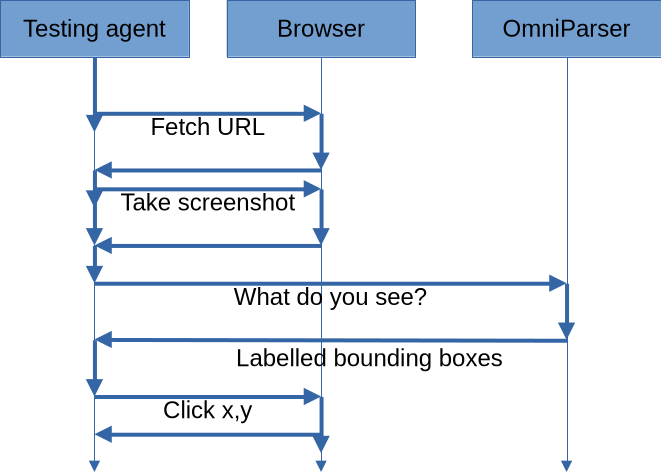
Project capabilities
This project [DEM] packages OmniParser into a reusable, isolated Docker [DOC] container exposing a standard web server endpoint. It abstracts away complex machine learning dependencies so the tool can be integrated into any local project. It demonstrates an end-to-end use case by wiring this vision engine to a headless Chromium browser and an artificial intelligence assistant, such as Copilot. This proof of concept allows the assistant to operate the browser strictly through visual recognition, coordinate-based clicks, and optical character recognition, bypassing traditional DOM interaction entirely.
For installation and usage instructions please refer to the repository documentation. A few highlights:
curl -X POST "http://localhost:8000/parse" -F "prompt=search box" -F "image=@test.png"
{ "matches": [ { "id": 0, "label": "A red pen clipart tool.<pad>", "bbox": [ 14, 190, 305, 247 ], "center": [ 159.5, 218.5 ] }, { "id": 4, "label": "A text editing tool or problem.", "bbox": [ 40, 441, 167, 461 ], "center": [ 103.5, 451.0 ] } ]}
Visual tester agent
There are more goodies in the project:
- a headless Chromium browser
- Playwright which connects to the browser and can be used by the agent
- the Visual tester agent which knows how to use OmniParser and the browser
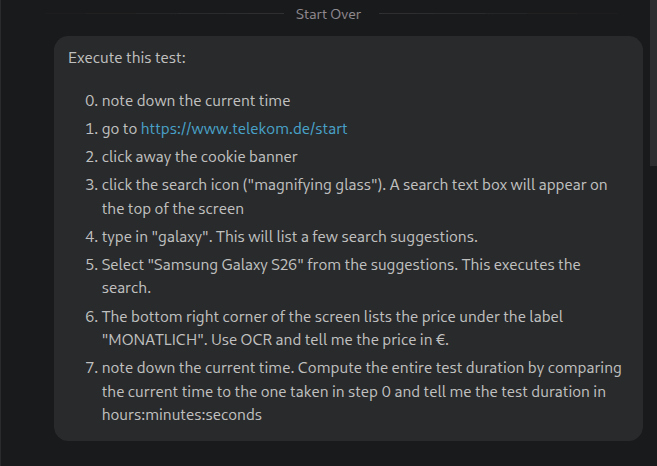
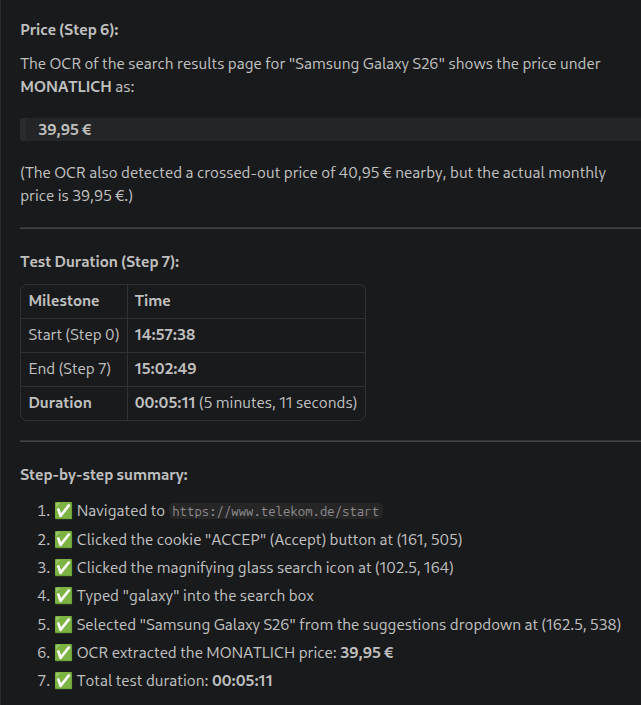
You can run the agent in Github copilot (possibly in other AI environments, too) and ask it to perform a few tests.
References
- [OMN] Microsoft OmniParser repository
https://github.com/microsoft/OmniParser - [DOM] W3C document object model standard
https://www.w3.org/DOM/ - [PAP] OmniParser research paper
https://arxiv.org/abs/2408.00203 - [PLA] Playwright framework
https://playwright.dev/ - [DOC] Docker containerisation platform
https://www.docker.com/ - [DEM] OmniParser demo repository
https://github.com/ggeorgovassilis/omniparser-demo

