TL;DR: Qwen3.5 31B at 15 t/s generation (500 t/s prefill) on 8GB VRAM as a daily driver, not a proof of concept.
Context & motivation
My crusade to democratise affordable AI is in full swing, whether that means patching inference engines[COL] or pushing cheap hardware to its limits[XLM]. I’m glad to see developments in software outpacing hardware, so I was quite happy when llama.cpp released a new feature which speeds up sparse models; until now, it just wasn’t clear to me how low that moves the threshold. Today I’ll show how to run a 35B model on 8GB of VRAM as a daily driver.
Previous attempts on the Acer Nitro V15 were proofs-of-concept. Gemma 4 12B[GM4] ran in 16GB of RAM at a few tokens per second. DeepSeek R1 14B[DSS] needed swap, kernel tuning and a lot of patience. This one is different: it’s the first local model that is in the same class as a frontier model from a year ago, at a speed I can work with, at 0€ / token.
The enabling change is llama.cpp v0.7.0[LLC]. It adds --moe-cache-mib, a GPU cache for mixture-of-experts weights that reside in host memory.
The hardware
I’m still on the Acer Nitro V15[ACN]. The relevant configuration is the Nvidia RTX 4060 mobile GPU with 8GB of VRAM, 64GB of system RAM and Ubuntu 24.04.
The model
Qwen3.6-35B-A3B[Q36] is a mixture-of-experts (MoE) 40 layer model with 35B and 3B active per token. It has 256 experts, of which 8 are routed plus one shared. Its special architecture ensures that the KV cache doesn’t grow too large, which makes context windows beyond toy-size workable.
I used Unsloth’s dynamic quantisation[U36], specifically Q4_K_XL, which is 22 GB. We’ve seen tremendous improvements in quantisation techniques this year, so I suspect there are better model variants around.
The command line
Here is the whole recipe:
./llama-server \
  -m /models/Qwen3.6-35B-A3B-UD-Q4_K_XL.gguf \
  -c 128000 \
  -ngl 100 \
  -np 1 \
  -ctk q8_0 \
  -ctv q8_0 \
  -cmoe \
  --moe-cache-mib 3000 \
  -lm mlock \
  -ub 4096
A short explanation of the arguments:
-mpoints at the model file.-c 128000sets a 128K context, half of the model’s native window.-ngl 100offloads every layer to the GPU. On its own this would fail, because the expert weights alone are around 18GB, but with this setup, we’re offloading experts to system RAM.-np 1gives the whole context to one slot. This is ok for interactive work, it’s probably a bottleneck for agentic workflows – but we have to fit all of this onto an 8GB machine.-ctk q8_0 -ctv q8_0stores the K and V caches as 8-bit values, which work fine in my experience. You can’t go higher or the model OOMs. You can go lower, but I observed that this reduces speed by a lot. I’m not sure why, since it should reduce the required memory transfer rate; maybe there’s some runtime data conversion going on which hits the bill.-cmoekeeps all expert tensors in system RAM as a baseline. This is what makes the model fit at all.--moe-cache-mib 3000partially undoes-cmoe, allocating 3GB of VRAM for an LRU cache (the new feature in llama.cpp) and keeps the hottest experts there.-lm mlocklocks the model in RAM so the kernel does not page it out. On 64GB this is comfortable, on 32GB it should still work.-ub 4096processes prompts in 4096-token physical batches. This was by far the biggest surprise to me. Initially I dismissed batching as a micro-optimisation, but it tripled token throughput from the defaults.
The server documentation[LCP] has the full list of flags.
The memory budget
By my counting, the 8GB VRAM is spent roughly like this:
- non-expert weights (attention, embeddings, output head): about 3GB on the GPU
- KV cache at 128K with q8_0: about 1.3GB
- expert cache: 3GB
- compute buffers for
-ub 4096: the remainder
That is close enough to 8GB that desktop compositing, a browser with hardware acceleration, or another CUDA process can push it over. If llama-server dies with a CUDA out-of-memory error, halve --moe-cache-mib first, then -ub, then -c.
The numbers
On this laptop the server reports about 500 tokens/s for prompt processing and about 15 tokens/s for generation. For programming & tooling, this is quite decent, since most of the work is reading prompts, source code and tool outputs. On a tangent: prefill is much more important than decode for programming/tool calling tasks, I have the numbers to prove it and I can quantify the “much more” part. But that’s a topic for another post.
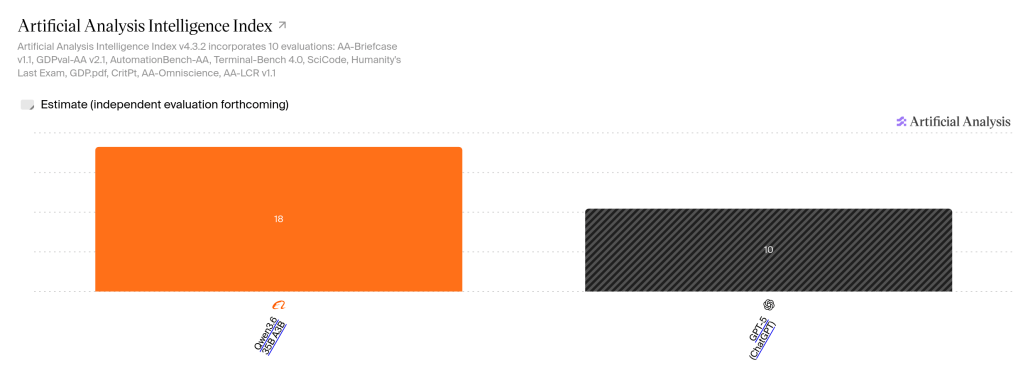
Beating ChatGPT 5
Now the title: says it all. The Artificial Analysis Intelligence Index, v4.3.2, downloaded on 18 October 2026. Hatched bars are estimates pending independent evaluation.
Artificial Analysis puts Qwen3.6 35B A3B at 18 and GPT-5, as served in ChatGPT, at 10 [GP5]. Before you dismiss that: remember, a year ago we were all working, mind-blown, with GPT-5.
Where it hurts
- VRAM is the first limit. On this laptop, it’s a discrete GPU and it doesn’t affect work or browsing. Where it’s the primary GPU, you’ll notice stutter and won’t be able to watch videos.
- Thermals matter. Qwen drains the NV15’s battery in no time and heats the machine up considerably. The earlier post on this laptop [ACN] has the details.
- 128K is not 256K. Doubling the context roughly doubles the KV cache and the prefill time. On 8GB, 128K is the sane ceiling.
- The model is multimodal, but the command above does not load the vision projector. I don’t even dare try this.
- In v0.7.0 the server listens on port 9931 by default, not 8080. The web UI is at
http://localhost:9931. - If you have 32GB of RAM, drop
-lm mlockand accept that the first few tokens after a pause may be slow. The model is 22.36GB, so there will not be much left for anything else.
Resources
[COL] Enable SSE on Sandybridge CPUs for Colibri https://github.com/JustVugg/colibri/pull/2042
[Q36] Qwen3.6-35B-A3B model card https://huggingface.co/Qwen/Qwen3.6-35B-A3B
[U36] Unsloth Qwen3.6-35B-A3B GGUF https://huggingface.co/unsloth/Qwen3.6-35B-A3B-GGUF
[LLC] llama.cpp v0.7.0 release https://github.com/ggml-org/llama.cpp/releases/tag/v0.7.0
[LCP] llama.cpp server documentation https://github.com/ggml-org/llama.cpp/blob/master/tools/server/README.md
[LMS] LLM Stats: GPT-5 vs Qwen3.6-35B-A3B https://llm-stats.com/models/compare/gpt-5-2025-08-07-vs-qwen3.6-35b-a3b
[AAN] Artificial Analysis: Qwen3.6 35B A3B vs GPT-5 https://artificialanalysis.ai/models/comparisons/qwen3-6-35b-a3b-vs-gpt-5
[GP5] Artificial Analysis: GPT-5 (ChatGPT) https://artificialanalysis.ai/models/gpt-5-chatgpt
[ACN] Ubuntu on the Acer Nitro V15 https://blog.georgovassilis.com/2025/05/26/ubuntu-on-the-acer-nitro-anv15-41/
[GM4] Running large LLMs on small hardware https://blog.georgovassilis.com/2026/06/04/running-large-llms-on-small-hardware-gemma-4-12b-on-a-vram-constrained-radeon-laptop/
[DSS] Running even larger LLMs on small hardware https://blog.georgovassilis.com/2026/07/17/running-even-larger-llms-on-small-hardware/
[XLM] Running even larger LLMs on small hardware https://blog.georgovassilis.com/2026/07/17/running-even-larger-llms-on-small-hardware/

